
Super Admin
Subscriptions map service packages to tenants. When you activate a subscription for a tenant, ICTPBX immediately seeds that tenant’s quota rows with the package limits – extensions, devices, voice minutes, fax pages, everything. You can upgrade or downgrade at any time and the change takes effect instantly.
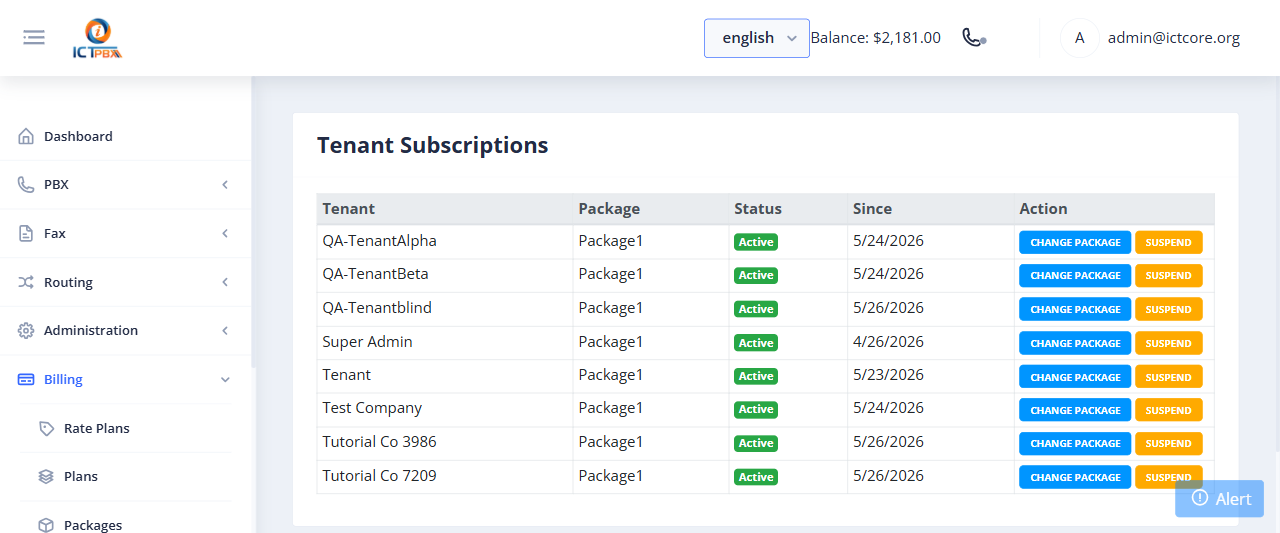
Assigning a Package to a Tenant
- Go to Billing › Subscriptions
- Find the tenant in the list (or click Add Subscription)
- Select the package from the dropdown
- Set the subscription start date
- Click Save
The system deactivates any previous subscription and activates the new one immediately. The tenant’s quota dashboard updates straight away.
When you upgrade a tenant to a larger package, their existing resources are preserved – ICTPBX just raises the limits. When you downgrade, ICTPBX raises the limits too (to the lower package levels), but it does not automatically delete resources that now exceed the new limits.
Upgrading and Downgrading
Find the tenant in the subscriptions list and change their package from the dropdown. There’s no downtime – the change happens in real time. The tenant’s billing quota dashboard shows the new limits immediately.
Related Features
- Billing Packages – create the package tiers to assign
- Billing Payments – add credit to a tenant’s balance
- Billing & Usage – what tenants see after subscription assignment