
ICTPBX Feature
Click-to-Call
Click-to-Call places a call straight from your browser, with no softphone to install. You enter a number in the portal, ICTPBX rings your own extension first, and once you pick up it bridges the call to the number you dialed. It works on any device that opens the web portal.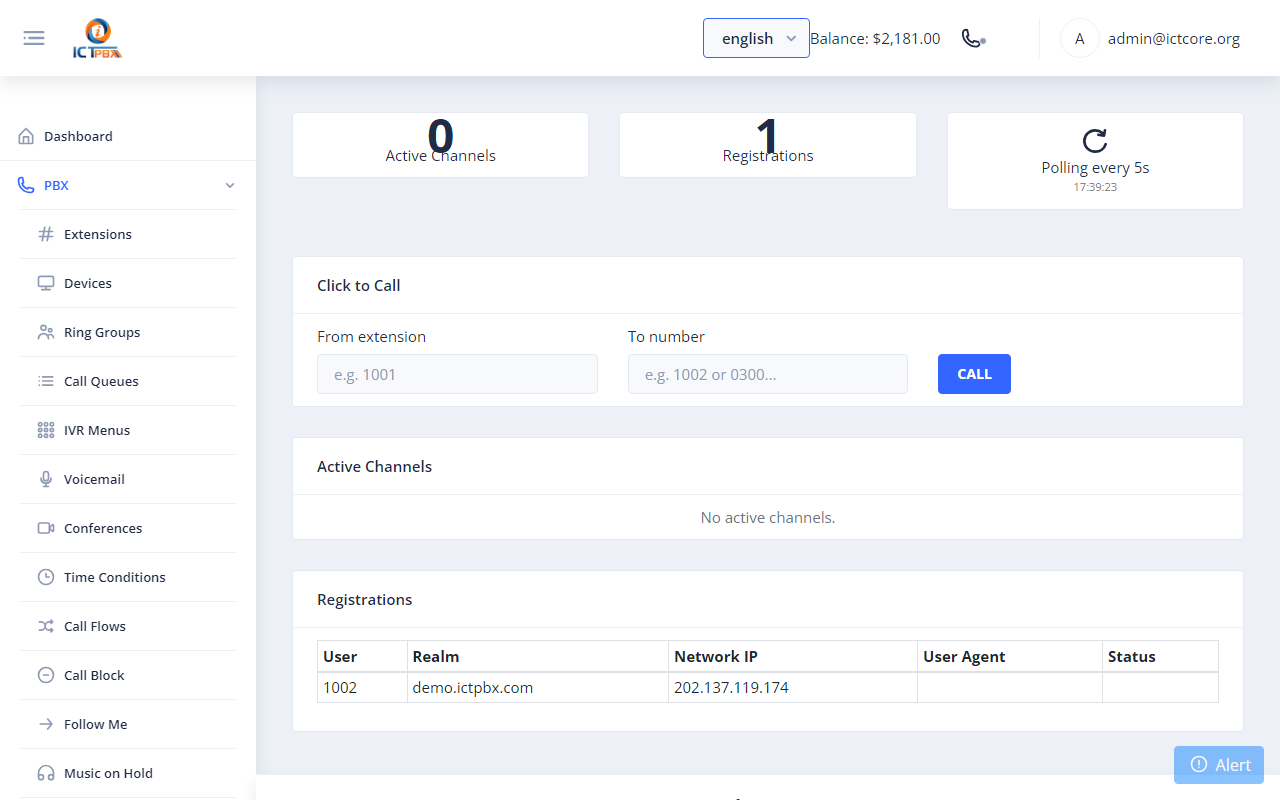
Click-to-Call suits anyone who lives in the portal and wants to start a call without reaching for a handset or launching desktop software. The phone you already use rings, then connects.
What you get
Call from the portal
Type or click a number and the platform starts the call for you. Your desk phone or webphone rings, then connects to the other party.No app required
Because the server bridges both legs of the call, you do not need a softphone running. A browser tab is enough to get a call going.Uses your real extension
The call goes out on your extension and caller ID, so the person you reach sees your number and the call lands in your CDR like any other.Pairs with the webphone
Combine Click-to-Call with the built-in WebRTC softphone for full browser calling, with no desktop install at all.Frequently asked questions
Do I need a headset or phone?
You need any endpoint registered to your extension, such as the built-in webphone or a desk phone. ICTPBX rings that first, then connects the call.
Is the call recorded in reports?
Yes. Click-to-Call uses your extension, so it appears in the PBX CDR reports alongside the rest of your calls.
How does the call get placed?
You start it from the ICTPBX portal. The server dials your extension, then bridges to the number you entered.
Does it cost extra?
No. Click-to-Call is part of the platform and uses your existing trunk and extension.