
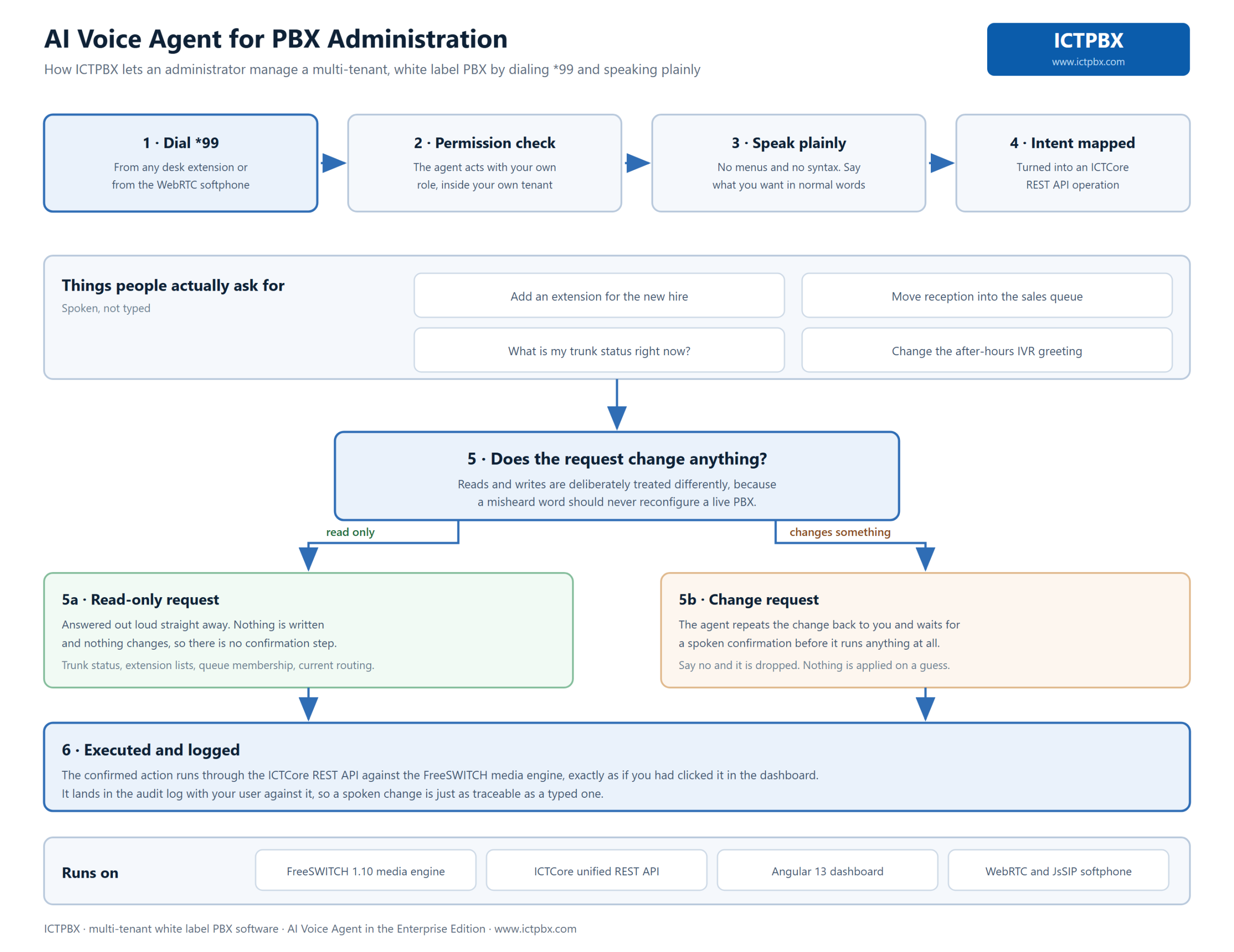
Imagine skipping the portal entirely and just telling your phone system what to do. That’s the ICTPBX AI voice agent. You dial *99 from your extension, say what you want in ordinary words, and it does the work by calling the same ICTCore API the web dashboard uses. It runs on your login, which means it can never reach past what your account already allows.
What it actually is
Under the hood, the agent is a small sidecar service running next to ICTCore. Dial *99 and FreeSWITCH streams your audio to it, where a short chain takes over: speech-to-text writes down what you said, a language model figures out which action you’re after, ICTCore carries it out, and text-to-speech reads the result back. That spoken reply is generated locally on your own server.
It’s worth being clear that this is an extra way in, not a replacement. Your web portal and softphone keep working exactly as they did. The agent just adds a voice channel on top of them.
What you can ask
It handles questions and changes alike. Once you hear the greeting, you might say things like:
- “What is my account balance?”
- “How many extensions do I have?”
- “Do I have any new voicemails?”
- “Create a ring group called Support.”
Ask it to read something and it just answers. Ask it to change something and it pauses first, repeats back what it’s about to do, and waits for you to say yes.
Why it can’t overstep
This is the question everyone asks, and it has a clean answer. The agent holds no credentials of its own. Every action it takes is an ICTCore call made as you, on your own scoped session. So an admin who dials *99 can run the whole system, a tenant admin stays inside their tenant, and an end user can only touch their own extension, voicemail, and account. The backend still runs the real permission check on each call, exactly as it does for the portal, and there’s simply no path to another tenant’s data because your session was never scoped that wide.
Identifying you takes no effort on your part. Dial from your extension and ICTPBX reads the calling number, then issues a scoped session with no PIN to speak aloud. And everything the agent does gets written to an append-only audit trail, so there’s always a record of what was asked and what changed.
One privacy note
Worth knowing before you switch it on: your spoken audio goes to a cloud speech-to-text provider for transcription, while the replies are generated locally on your server. If your organization has data-egress or compliance rules, talk the voice path through with your administrator first.
The AI voice agent is an optional Enterprise Edition add-on, installed on the server separately from the core stack. For the full walkthrough, see the AI Voice Agent guide, and browse the rest of the platform on the support center.
Frequently asked questions
How do I start the agent?
Dial *99 from a registered extension or softphone, wait for the greeting, and speak. Hang up when you’re finished.
What if *99 does nothing?
A fast busy or dead air usually means the add-on isn’t installed or isn’t running. Your administrator can check.
Can the agent change settings without asking?
No. For anything that creates, updates, or deletes, it reads the action back and waits for a spoken yes.
Does it replace the web portal?
No. It’s a voice channel on top. The portal and softphone carry on as before.
Is the AI voice agent in Community Edition?
No. It’s an optional Enterprise Edition add-on and isn’t part of Community builds.